UDF Libraries
The UDF Libraries page (/udf) is used to manage JavaScript user-defined function libraries available to FalkorDB.
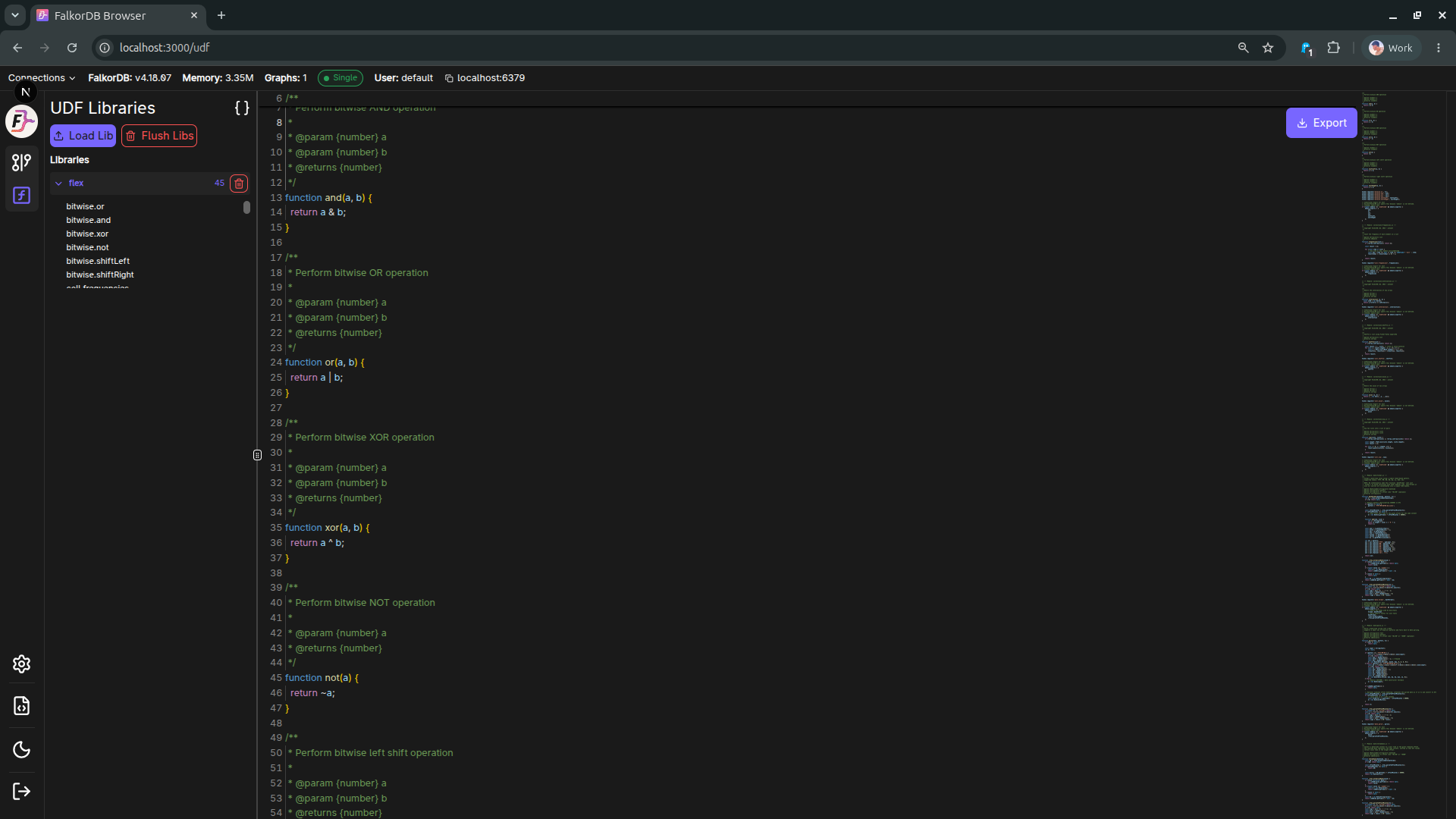
What you can do
- Load Lib
- Upload a UDF library file and register it on the server.
- Flush Libs
- Remove loaded libraries from the current environment.
- Browse libraries
- View currently loaded library names in the left panel.
- Inspect code
- Open a loaded library and review its source in the editor area.
- Export
- Download the currently viewed library source.
Typical workflow
- Open /udf from the left navigation.
- Click Load Lib and select your JavaScript UDF file.
- Confirm the library appears in the Libraries list.
- Click the library entry to inspect its code.
- Use Export if you need to download the current source.
Notes
- UDF behavior depends on server-side support and permissions.
- If you do not see expected libraries, verify your connection and user role.
Frequently Asked Questions 4
Where do I manage user-defined functions in Browser?
Use the UDF Libraries page at /udf, accessible from the left navigation.
What file format should I upload with Load Lib?
Upload a JavaScript UDF library file that follows FalkorDB UDF conventions.
What does Flush Libs do?
It clears loaded UDF libraries from the current environment.
Can I view and download library code from the UI?
Yes. Select a library to view its source, then use Export to download it.