Metadata View
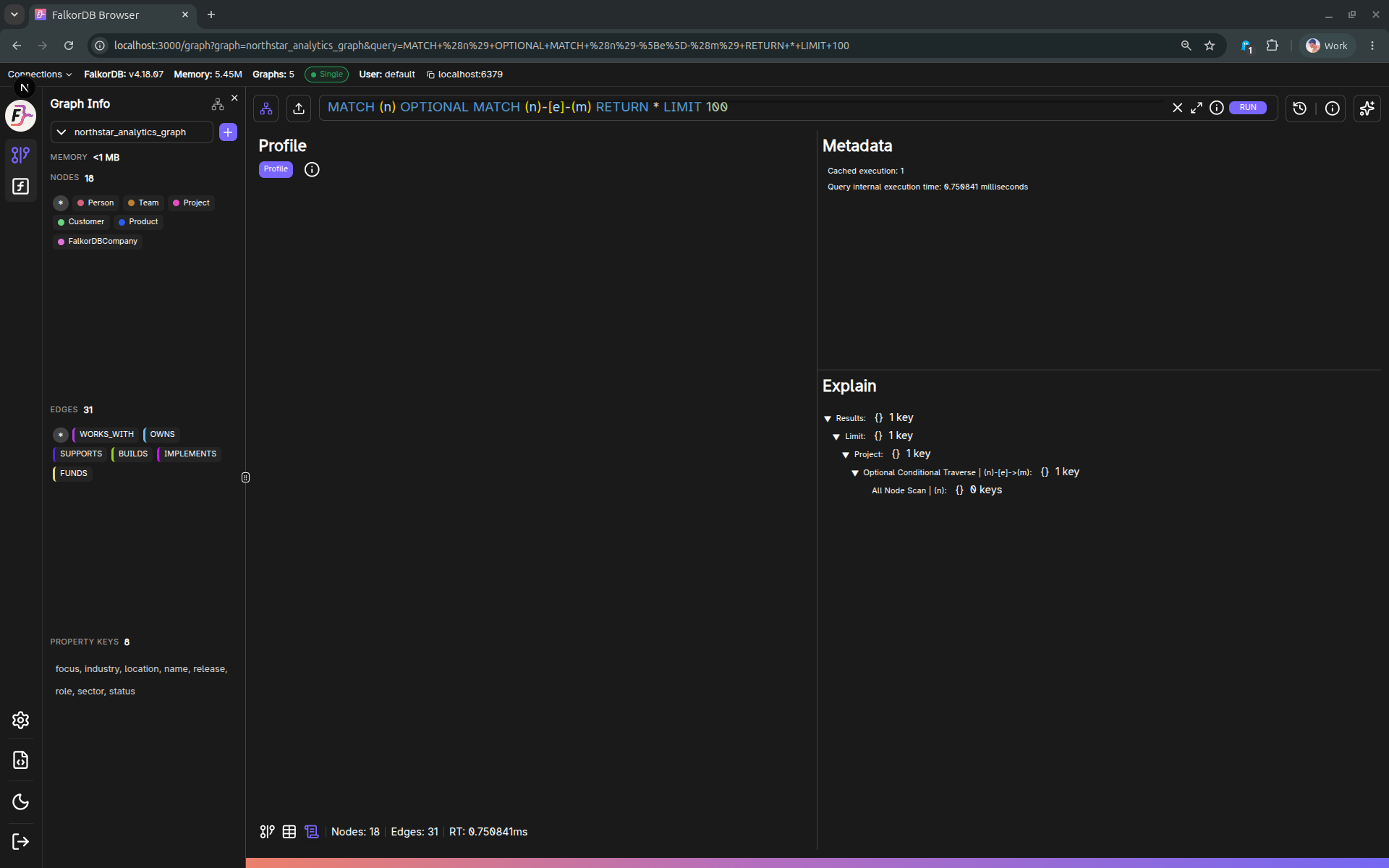
The Metadata tab provides query execution details for the current query.
Sections
The UI is split into three main panels:
- Profile
- Runs a profiling request and renders the output as a nested tree.
- Warning: profiling can be intrusive depending on the database behavior.
- Metadata
- Displays metadata text lines.
- Explain
- Displays explain-plan output as a nested tree.
When it’s enabled
The Metadata tab is enabled when the current query has metadata/explain content.
Frequently Asked Questions 4
What is the difference between Explain and Profile?
Explain shows the planned execution steps without running the query. Profile actually executes the query and shows real performance data including time spent at each step.
When is the Metadata tab available?
The Metadata tab is enabled when the current query has metadata or explain content available. It appears alongside the Graph and Table tabs in the results area.
Is Profile safe to run on production?
Be cautious — profiling actually executes the query and can be intrusive depending on database behavior and query complexity. Use Explain for a non-invasive execution plan.
How is the execution plan displayed?
Both Explain and Profile output are rendered as a nested tree structure, showing the hierarchy of operations in the query execution plan.