Query History
Query History stores previously executed queries in the browser (localStorage) and exposes a dialog to browse them.
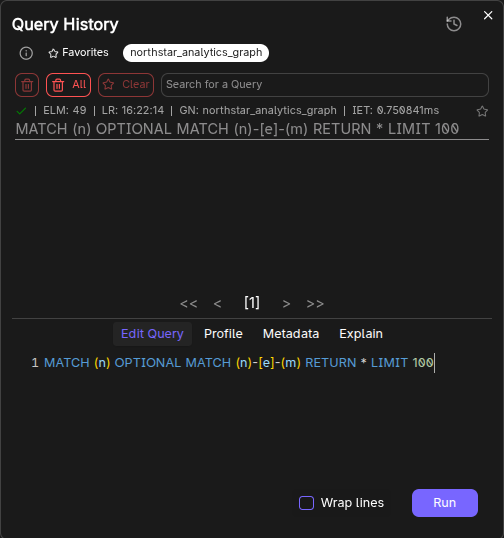
Opening Query History
Click the history button (clock icon) in the selector bar.
If there are no saved queries, the button is disabled.
What you can do
Inside the Query History dialog:
- Search previous queries.
- Filter by graph name (toggle one or more graphs).
- Select a query to load it into the history editor.
- View per-query tabs:
- Edit Query
- Profile
- Metadata
- Explain
Deleting history
The dialog supports:
- Delete selected queries (supports multi-select via Ctrl + right-click)
- Delete all queries
Persistence notes:
- Stored under localStorage key:
query history.
Frequently Asked Questions 4
Where is query history stored?
Query history is stored in your browser’s localStorage under the key query history. It persists across sessions but is local to your browser.
How do I open the Query History dialog?
Click the history button (clock icon) in the selector bar above the query editor. The button is disabled if no queries have been saved yet.
Can I delete specific queries from history?
Yes. In the Query History dialog, use Ctrl + right-click to multi-select queries, then delete the selected ones. You can also delete all queries at once.
Can I filter history by graph?
Yes. The dialog includes a filter by graph name option that lets you toggle one or more graphs to narrow down the displayed queries.