Settings Page
The Settings page (/settings) is where you configure Browser behavior and manage security/admin features.
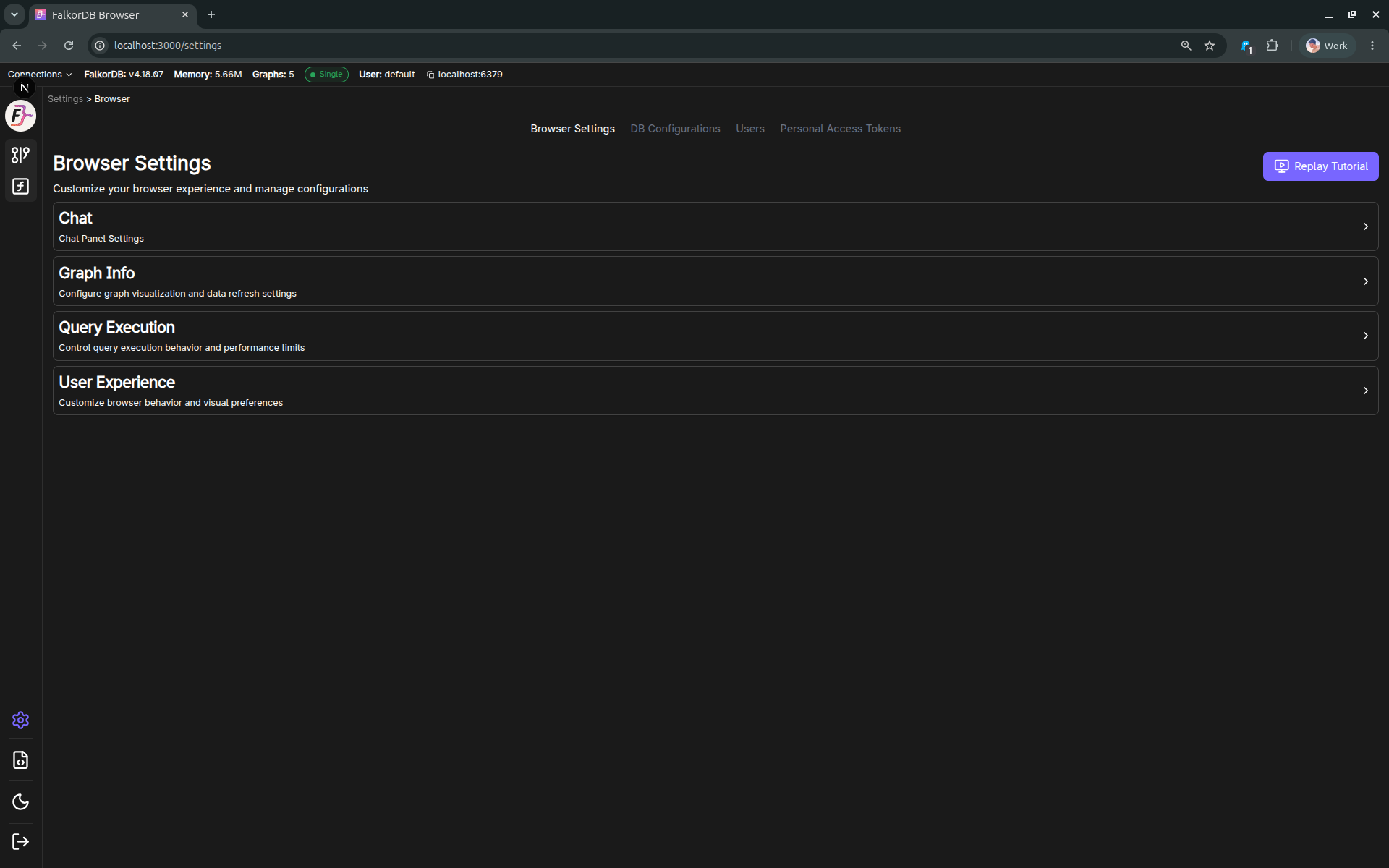
Tabs / sections
The Settings page is organized into these sections:
- Browser Settings (all users)
- Personal Access Tokens (all users)
- DB Configurations (Admin only; requires online connection)
- Users (Admin only; requires online connection)
If you navigate away from Browser Settings while there are unsaved changes, the UI prompts you to Save or Discard changes.
Browser Settings
The Browser Settings panel is a page that can be scrolled, with grouped sections (collapsed/expanded in the UI). Common settings include:
- Query execution
- Query timeout
- Result limits
- Default query behavior (run a default query when selecting a graph)
- User experience
- Content persistence (restores the last used graph + query from localStorage)
- Node caption priority keys (controls how node labels/captions are picked)
- Property-key display options (e.g. prefix behavior)
- Graph Info
- Refresh interval (how often graph info refreshes)
- Chat
- LLM connection source: cloud/API key or local LLM
- Saved cloud API keys
- Local provider: Ollama or LM Studio
- Local endpoint URL
- Model selection
- Current LLM connection indicator
- How many interactions to store locally
Chat and LLM connection
Use Settings → Browser Settings → Chat to choose what powers the Chat panel.
You can use either:
| Option | What it means | What you need |
|---|---|---|
| Cloud/API key | Chat uses a hosted LLM provider such as OpenAI, Anthropic, Gemini, Groq, Cohere, xAI, or DeepSeek. | Add a provider API key, select the saved key, then select a model. |
| Local LLM | Chat uses a model running on your own machine. | Start Ollama or LM Studio locally, choose the provider, confirm the endpoint, then select a model. |
The LLM connection area shows what Chat is currently configured to use. The status badge shows:
- Saved when the displayed source, key/provider, endpoint, and model are already saved.
- Pending when you changed something and still need to click Save Settings.
For local LLMs, the default endpoints are:
| Provider | Default endpoint |
|---|---|
| Ollama | http://localhost:11434 |
| LM Studio | http://localhost:1234/v1 |
If models do not appear, make sure the local server is running and the endpoint is correct.
Replay Tutorial
Browser Settings includes a Replay Tutorial action, which re-runs the guided tour overlay.
Personal Access Tokens
The Tokens section provides a UI to:
- Create tokens (often with optional expiry)
- View/revoke existing tokens
Admin-only sections
DB Configurations (Admin)
Allows viewing/updating database configuration values via the server API.
Users (Admin)
Allows:
- Viewing users
- Changing roles
- Adding/removing users
Keyboard shortcut
Escnavigates back (with a save/discard prompt if there are unsaved Browser Settings changes).
Frequently Asked Questions 5
How do I configure the Chat/LLM feature?
Go to Settings → Browser Settings → Chat. Choose Cloud/API key to use a hosted provider key, or Local LLM to use Ollama or LM Studio. Then select the key/provider, endpoint if local, and model, and click Save Settings.
What can Admin users do that regular users cannot?
Admin users can access DB Configurations (view/update server config) and Users management (add/remove users, change roles). These sections require an online connection.
How do I create a Personal Access Token?
Go to Settings → Personal Access Tokens and click create. You can optionally set an expiry date. Tokens can be revoked from the same section.
What happens if I navigate away from Settings with unsaved changes?
The UI prompts you to Save or Discard your unsaved Browser Settings changes before navigating away.
How do I replay the onboarding tutorial?
Go to Settings → Browser Settings and click the Replay Tutorial action to re-run the guided tour overlay.