Graph Info Panel
The Graph Info panel provides quick, clickable insights into the selected graph’s structure.
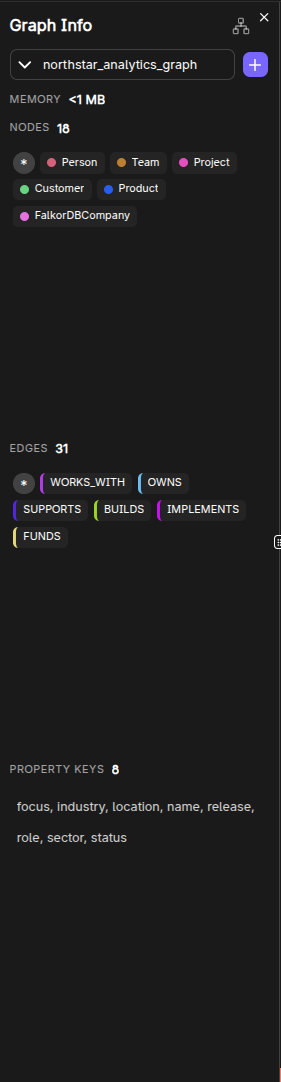
What it shows
- Graph name
- Memory usage (optional; can be toggled via settings)
- Node count and edge count
- Node labels
- Edge (relationship) types
- Property keys
Click-to-explore behavior
The panel is designed for exploration:
- Clicking a label runs
MATCH (n:Label) RETURN n. - Clicking an edge type runs
MATCH p=()-[:TYPE]-() RETURN p. - Clicking a property key runs a query that finds nodes/edges where that key exists.
It also provides “*” shortcuts:
- All nodes (
MATCH (n) RETURN n) - All edges (
MATCH p=()-[]-() RETURN p)
Style customization entrypoint
Next to each label, a palette button opens the Style Settings panel for that label.
Frequently Asked Questions 4
How do I explore nodes of a specific label?
Click a label name in the Graph Info panel. This automatically runs MATCH (n:Label) RETURN n and displays the results on the canvas.
Can I see all edges of a specific relationship type?
Yes. Click an edge type in the Graph Info panel to run MATCH p=()-[:TYPE]-() RETURN p and visualize all relationships of that type.
What does the memory usage indicator show?
It shows the current memory utilization of the selected graph in MB. This can be toggled on/off in Browser Settings.
How do I change the visual style of a label?
Click the palette icon next to a label in the Graph Info panel to open the Style Settings panel where you can change color and size.