Style Panel
The Style panel (“Style Settings”) customizes how nodes of a specific label appear in the graph.
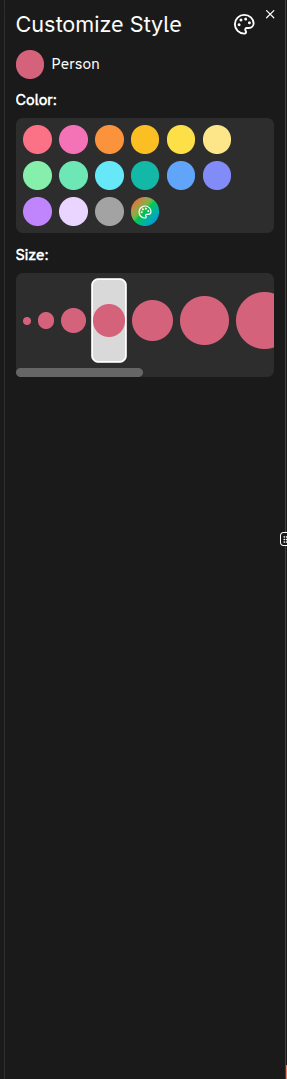
How to open
- Open Graph Info.
- Click the palette icon next to a node label.
What you can change
- Color
- Preset colors
- Custom color via a red/green/blue color picker
- Size
- Choose from predefined size options
Changes are previewed immediately on the canvas.
Save vs Cancel
- Save
- Closes the panel.
- Persists the style to browser storage (localStorage) so the label keeps the style.
- Cancel / Close
- Reverts to the original style values.
Tutorial note
During the tutorial, saving style changes is intentionally prevented.
Frequently Asked Questions 4
How do I open the Style panel?
Open the Graph Info panel, then click the palette icon next to the node label you want to customize.
Are style changes saved automatically?
No. You must click Save to persist changes to localStorage. Clicking Cancel or closing the panel reverts to the original style.
Can I use a custom color?
Yes. Besides preset colors, you can choose a custom color using the red/green/blue color picker.
Do style changes affect other users?
No. Styles are stored in your browser’s localStorage and only apply to your session. Other users will see their own style settings.