

Running queries
- Click RUN to execute.
- Keyboard shortcuts:
- Enter: run query (when the suggestion widget is not open)
- Cmd/Ctrl + Enter: run query
- Shift + Enter: insert a newline
Query history navigation (keyboard)
When your cursor is on the first line or last line of the editor:- Up arrow: navigate backward through query history
- Down arrow: navigate forward through query history
Real-time syntax validation
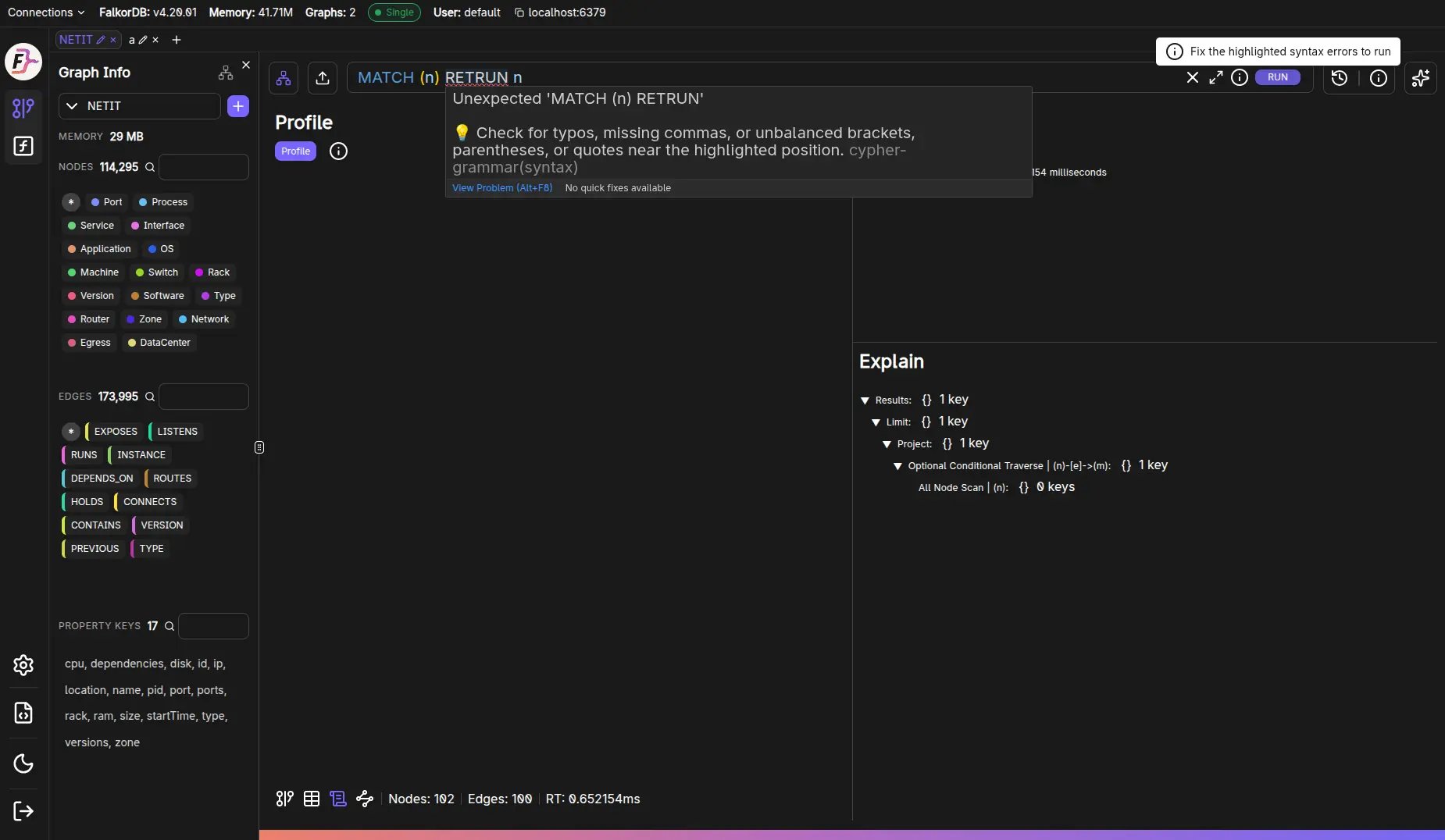
The editor parses your Cypher as you type with a full openCypher grammar extended for FalkorDB, and underlines syntax errors immediately.- The RUN tooltip reads Fix the highlighted syntax errors to run while the query is invalid, and running it raises a Syntax Error message instead of sending it to the server. Only runtime and semantic errors ever reach the database.
- Hovering an underlined span explains the problem.
- The quick-fix menu offers Did you mean…? replacements for likely typos, plus ✨ Fix with AI when Chat is configured with a model.
Autocomplete & syntax highlighting
The editor provides:- Cypher keyword suggestions covering the full openCypher keyword set plus FalkorDB extensions
- Built-in function and procedure suggestions
- User-defined function (UDF) suggestions
- Graph-scoped suggestions (labels, relationship types, property keys) fetched from the server for the selected graph
- Variables bound earlier in the query
Maximize mode
The maximize button opens a full-screen editor dialog with the same Run/Clear controls.Frequently Asked Questions
What keyboard shortcuts are available for running queries?
What keyboard shortcuts are available for running queries?
Press Enter to run a query (only when the autocomplete suggestion widget is closed) or Cmd/Ctrl + Enter to run regardless. Use Shift + Enter to insert a newline without executing.
Does the editor support autocomplete?
Does the editor support autocomplete?
Yes. The Monaco-based editor suggests Cypher keywords, built-in functions and procedures, user-defined functions, graph-scoped names (labels, relationship types, property keys) fetched from the server, and variables already bound in the query.
Why won't my query run?
Why won't my query run?
The editor validates Cypher syntax as you type. If the RUN tooltip says Fix the highlighted syntax errors to run, correct the underlined text. Open the quick-fix menu for a Did you mean…? replacement, or ✨ Fix with AI when Chat is configured.
Can I expand the editor to full screen?
Can I expand the editor to full screen?
Yes. Click the maximize button to open a full-screen editor dialog with the same Run and Clear controls.