> ## Documentation Index
> Fetch the complete documentation index at: https://docs.falkordb.com/llms.txt
> Use this file to discover all available pages before exploring further.
> ## Agent Instructions
> FalkorDB is a graph database that speaks the Redis protocol. Queries are issued as OpenCypher through the GRAPH.QUERY and GRAPH.RO_QUERY commands, not over Bolt or a SQL connection.
> FalkorDB implements a subset of OpenCypher with proprietary extensions. Do not assume Neo4j-only syntax or procedures are available — check /cypher/cypher-support and /cypher/known-limitations before using a clause.
> FalkorDB is the successor to RedisGraph, but they are separate products. Do not present RedisGraph commands, versions, or limitations as current FalkorDB behavior.
> Use the official clients listed in /getting-started/clients rather than generic Redis or Neo4j drivers, and prefer the language the user is already working in.
> Configuration parameters are set with GRAPH.CONFIG SET or at startup; cite the exact parameter name from /getting-started/configuration rather than inventing one.
> This site covers four products: FalkorDB (core), FalkorDB Cloud, FalkorDB Enterprise, and the GraphRAG SDK. Name which one an answer applies to, since setup and operations differ.
# Schema View
> Explore a graph's data model: labels, relationship placements, property keys and their types, constraints, and indexes.
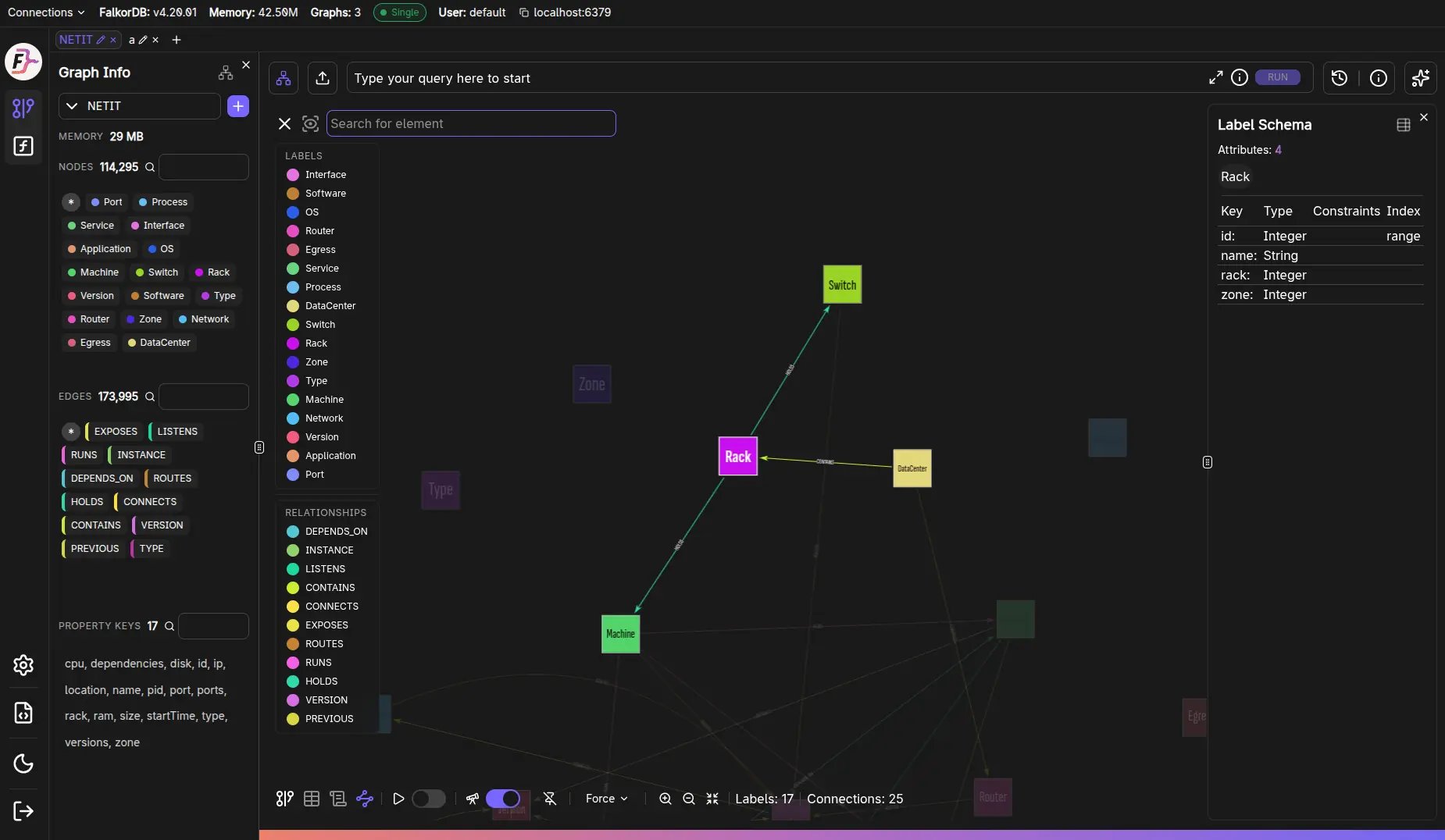
The **Schema** tab shows the shape of the selected graph rather than the result
of your query. It is derived from the graph itself with read-only queries, so
opening it never modifies data and never re-runs the query in the editor.
 ## What it draws
* **Nodes** are node **labels**. Nodes without any label appear as a single
`No Label` entry.
* **Links** are relationship **placements** — one link per distinct
`(source label, relationship type, target label)` triple found in the graph.
Two labels connected by the same type in both directions therefore show two
links.
Because a link is a placement and not a relationship type, the counter under
the canvas reads `Connections`, not "relationships".
## Controls
The Schema tab reuses the graph canvas, so panning, zooming, layouts, and the
Labels/Relationships filters behave the same way as on the
[Graph canvas](/browser/ui/graph-canvas). The controls next to the tab strip
are:
* **Zoom in** / **Zoom out**
* **Fit graph to screen**
* `Labels: n` — how many labels were discovered
* `Connections: n` — how many placements were drawn
Editing controls are hidden: the Schema tab is always read-only, so there is no
Add node, Add edge, or Delete.
There is no refresh button. The schema is rediscovered whenever you open the
tab, and results are cached per tab so switching back is instant.
## Inspecting a label or relationship type
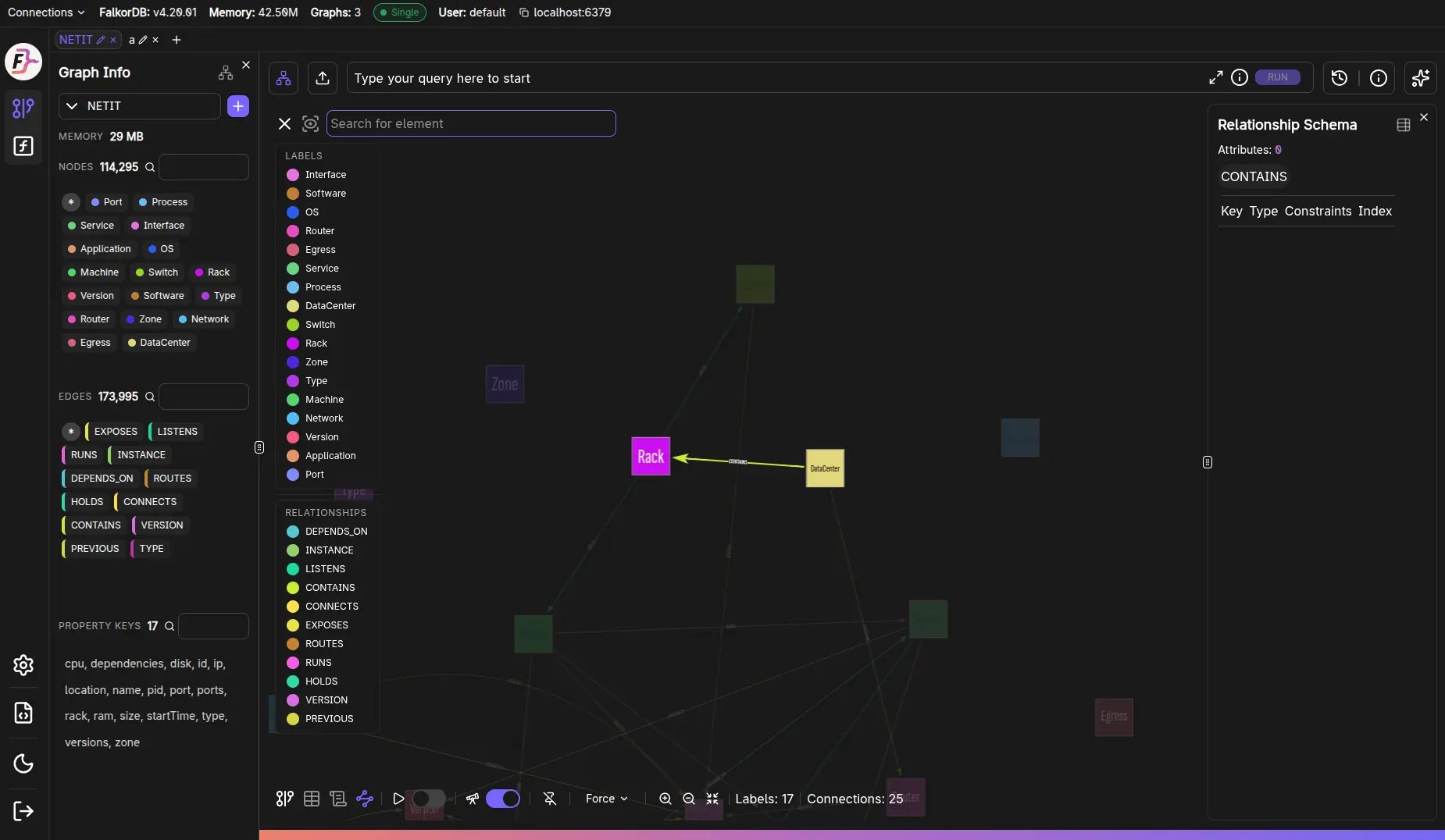
Select a node or a link to open the details panel, titled **Label Schema** or
**Relationship Schema**. It lists every property key discovered for that label
or relationship type in four columns:
| Column | What it shows |
| :-------------- | :------------------------------------------------------------------------------------------------------------------------------------- |
| **Key** | The property key. |
| **Type** | The value type(s) seen for that key. A key used with more than one type shows them joined, for example `Integer \| String`. |
| **Constraints** | A **Unique** badge when no two elements may hold the same value, and a **Mandatory** badge when every element must carry the property. |
| **Index** | The index types covering the property: `range`, `fulltext`, or `vector`. Empty when the property is not indexed. |
## What it draws
* **Nodes** are node **labels**. Nodes without any label appear as a single
`No Label` entry.
* **Links** are relationship **placements** — one link per distinct
`(source label, relationship type, target label)` triple found in the graph.
Two labels connected by the same type in both directions therefore show two
links.
Because a link is a placement and not a relationship type, the counter under
the canvas reads `Connections`, not "relationships".
## Controls
The Schema tab reuses the graph canvas, so panning, zooming, layouts, and the
Labels/Relationships filters behave the same way as on the
[Graph canvas](/browser/ui/graph-canvas). The controls next to the tab strip
are:
* **Zoom in** / **Zoom out**
* **Fit graph to screen**
* `Labels: n` — how many labels were discovered
* `Connections: n` — how many placements were drawn
Editing controls are hidden: the Schema tab is always read-only, so there is no
Add node, Add edge, or Delete.
There is no refresh button. The schema is rediscovered whenever you open the
tab, and results are cached per tab so switching back is instant.
## Inspecting a label or relationship type
Select a node or a link to open the details panel, titled **Label Schema** or
**Relationship Schema**. It lists every property key discovered for that label
or relationship type in four columns:
| Column | What it shows |
| :-------------- | :------------------------------------------------------------------------------------------------------------------------------------- |
| **Key** | The property key. |
| **Type** | The value type(s) seen for that key. A key used with more than one type shows them joined, for example `Integer \| String`. |
| **Constraints** | A **Unique** badge when no two elements may hold the same value, and a **Mandatory** badge when every element must carry the property. |
| **Index** | The index types covering the property: `range`, `fulltext`, or `vector`. Empty when the property is not indexed. |
 ## How the schema is discovered
* Relationship placements and the label list are read exactly, aggregated on
the server.
* Property keys are **sampled**: up to 10 elements per label and per
relationship type are inspected. This keeps discovery fast on large graphs,
but a key that only appears on rarely used elements may not be listed.
* Constraints and index information come from the graph's own constraint and
index metadata, so they are exact.
## Per-tab state
Schema state belongs to the [graph tab](/browser/ui/graph-tabs) it was opened
in: layout, viewport, hidden labels, and the selected element are remembered
separately from the Graph tab's own state, and are restored when you come back.
## Related pages
* [Main graph canvas](/browser/ui/graph-canvas)
* [Graph tabs](/browser/ui/graph-tabs)
* [Data / Property panel](/browser/ui/data-panel)
## Frequently Asked Questions
No. The schema is discovered with separate read-only queries. Your query, its results, and the Graph/Table/Metadata tabs are untouched.
Each link is a placement — a distinct source label, relationship type, and target label combination. One relationship type can produce several placements, so the count is of drawn links.
Property keys are sampled from up to 10 elements per label or relationship type. A key carried only by elements outside that sample is not reported.
They reflect the graph's constraints. **Unique** means no two elements of that label or type can hold the same value for the property. **Mandatory** means every element of that label or type must carry the property.
Switch away from the Schema tab and back. The schema is rediscovered each time the tab is opened.
## How the schema is discovered
* Relationship placements and the label list are read exactly, aggregated on
the server.
* Property keys are **sampled**: up to 10 elements per label and per
relationship type are inspected. This keeps discovery fast on large graphs,
but a key that only appears on rarely used elements may not be listed.
* Constraints and index information come from the graph's own constraint and
index metadata, so they are exact.
## Per-tab state
Schema state belongs to the [graph tab](/browser/ui/graph-tabs) it was opened
in: layout, viewport, hidden labels, and the selected element are remembered
separately from the Graph tab's own state, and are restored when you come back.
## Related pages
* [Main graph canvas](/browser/ui/graph-canvas)
* [Graph tabs](/browser/ui/graph-tabs)
* [Data / Property panel](/browser/ui/data-panel)
## Frequently Asked Questions
No. The schema is discovered with separate read-only queries. Your query, its results, and the Graph/Table/Metadata tabs are untouched.
Each link is a placement — a distinct source label, relationship type, and target label combination. One relationship type can produce several placements, so the count is of drawn links.
Property keys are sampled from up to 10 elements per label or relationship type. A key carried only by elements outside that sample is not reported.
They reflect the graph's constraints. **Unique** means no two elements of that label or type can hold the same value for the property. **Mandatory** means every element of that label or type must carry the property.
Switch away from the Schema tab and back. The schema is rediscovered each time the tab is opened.